
How Much Does Website Design Cost in 2026? Complete Pricing Guide for Startups & Small Businesses
Stop overpaying for website design! Learn real 2026 pricing: basic sites ($500-$1,500), professional ($2,500-$6,000), e-commerce ($3,000-$15,000). Avoid hidden costs, choose the right agency & maximize ROI. Complete guide covers templates vs custom, DIY vs professional, ongoing costs & when to invest more. Free consultation available!
WEBSITE DESIGN SERVICES
1/23/202626 min read


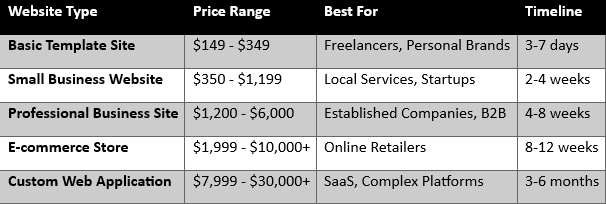
Quick Answer: Website Design Cost at a Glance
Looking for transparent pricing? Get your free custom quote from HODS.
Introduction: Why Website Design Cost Matters in 2026
In today's digital-first economy, a website is no longer optional—it is a core business asset. Whether you are a startup, an SME, or an established enterprise, one of the first strategic questions you will face is how much does website design cost and what exactly you are paying for.
The answer has no single number because website design pricing depends on multiple variables, including website type, functionality, design complexity, and the agency you choose. More importantly, asking "how much should I pay for a website?" is really asking: "What level of digital maturity does my business need right now?"
This comprehensive guide educates decision-makers, entrepreneurs, and business owners about:
Realistic website design costs in 2026
What influences pricing (and where you can save)
How to choose affordable web design services without sacrificing quality
Hidden costs that catch businesses off guard
ROI perspective: when to invest more vs. start small
Bottom Line: A website is not an expense—it's an investment. Understanding professional website design costs allows you to set realistic budgets, avoid overpaying, compare agencies objectively, and align features with business objectives.
Why Website Design Cost Matters for Business Success
The Cost of a Bad Website
A poorly designed website doesn't just fail to generate leads—it actively damages your business:
- Damages credibility - 94% of first impressions are design-related
- Reduces conversions - Slow sites lose 53% of mobile visitors
- Hurts SEO rankings - Poor UX signals reduce search visibility
- Wastes marketing budget - Paid traffic to bad sites = wasted money
The Value of Professional Design
A well-designed website generates measurable returns:
- Generates consistent leads - Professional sites convert 200-400% better
- Improves brand authority - Builds trust and credibility instantly
- Creates long-term ROI - One-time investment, years of performance
- Supports marketing efforts - Every channel points back to your site
Real Example: A startup investing $3,000 in professional web design that generates 20 leads/month at $150 value each = $3,000/month return. The site pays for itself in one month.
When evaluating how much does a website cost for a small business, consider the opportunity cost of not having an effective website.
How Much Does Website Design Cost? (Complete 2026 Breakdown)
Understanding website design pricing requires looking at structured tiers. Here's a realistic, industry-based breakdown for 2026.
1. Basic Website Design Cost ($149 – $349)
Best for: Freelancers, personal brands, solopreneurs, side projects
What's Included:
3-5 static pages (Home, About, Services, Contact, Blog)
Template-based design (pre-built themes)
Basic mobile responsiveness
Contact form integration
Social media links
Basic SEO setup
What's NOT Included:
Custom design or branding
E-commerce functionality
Advanced SEO optimization
Content writing
Ongoing maintenance
Timeline: 3-7 days
Platform: Usually WordPress, Wix, or Squarespace
When This Makes Sense:
This falls under affordable web design services and works for:
Testing a business idea with minimal investment
Building an online presence placeholder
Personal portfolios or simple informational sites
Very tight budgets (under $500 total)
Limitation: Template sites look similar to thousands of other sites. Limited customization means you can't fully control branding or user experience.
DIY Alternative: $0-$100 using Wix, Squarespace, or WordPress.com (but requires your time and lacks professional polish)
2. Small Business Website Design ($350 – $1,199)
Best for: Local businesses, service providers, startups, consultants
What's Included:
5-10 custom pages
Semi-custom design (customized templates)
Custom UI elements (buttons, forms, sections)
CMS integration (WordPress or similar)
SEO-friendly structure
Speed optimization basics
Mobile-responsive design
Contact forms and basic integrations
Google Analytics setup
Social media integration
What's NOT Included:
Fully custom design from scratch
E-commerce functionality
Advanced features (booking, memberships)
Professional copywriting
Ongoing monthly maintenance
Timeline: 2-4 weeks
Platform: WordPress, Webflow, or custom HTML/CSS
When This Makes Sense:
This is the most common tier for small business website design where businesses seriously evaluate cost versus value. Ideal when you:
Need more than a basic presence
Want some brand customization
Require SEO-friendly architecture
Plan to update content yourself (CMS)
Have a defined business model and target audience
Real-World Example: A local law firm, dental practice, consulting agency, or home services business typically fits this tier.
Value Proposition: Professional appearance without enterprise pricing. Good balance of affordability and functionality.
3. Corporate or Professional Website ($1,200 – $6,000)
Best for: Established businesses, B2B companies, growing startups, professional services
What's Included:
10-25 custom pages
Fully custom UX/UI design
Brand-aligned layouts and visual identity
Advanced SEO structure and schema markup
Security hardening (SSL, firewalls, monitoring)
Performance optimization (CDN, caching, compression)
Custom animations and interactions
Blog/news section with CMS
Lead capture forms and CRM integration
Email marketing integration
Analytics and conversion tracking
Multiple rounds of revisions
Professional copywriting (often included)
Stock photography or basic custom photos
Timeline: 4-8 weeks
Platform: Custom WordPress, Webflow, or custom-built
When This Makes Sense:
At this level, choosing the right web design agency becomes critical. Invest here when:
Your website is a primary lead generation channel
Brand differentiation matters in your market
You compete against established players
Customer trust and credibility are essential
You need advanced features without full custom development
Strategic Consideration: This tier delivers the best ROI for most growing businesses. The investment in professional design, proper SEO, and performance optimization pays dividends through:
Higher conversion rates (2-3x vs basic sites)
Better search rankings (ongoing organic traffic)
Reduced bounce rates (improved user experience)
Stronger brand perception (builds authority)
Real-World Example: A SaaS company, digital agency, established consultant, or multi-location service business benefits most from this investment level.
4. E-commerce Website Design ($1,999 – $10,000+)
Best for: Online stores, retail brands, product-based businesses, dropshipping
What's Included:
Product catalog system (hundreds to thousands of products)
Shopping cart and checkout functionality
Payment gateway integration (Stripe, PayPal, etc.)
Inventory management system
Order tracking and management
Customer account portals
Security and compliance (SSL, PCI-DSS)
Product search and filtering
Related products and upsells
Wishlist functionality
Email notifications (order confirmation, shipping updates)
Tax and shipping calculators
Coupon/discount system
Mobile-optimized shopping experience
Reviews and ratings integration
Cost Variables for E-commerce:
$1,999 - $3,500: Simple stores (10-50 products, template customization)
$3,500 - $7,000: Medium stores (50-500 products, semi-custom design)
$7,000 - $10,000+: Large stores (500+ products, fully custom, multiple integrations)
Timeline: 8-12 weeks
Platform: Shopify, WooCommerce, BigCommerce, or custom
When This Makes Sense:
E-commerce requires specialized expertise. Invest here when:
Products are your primary revenue source
You need inventory management automation
Multiple payment methods are required
You're scaling from marketplace to owned platform
Customer experience directly impacts sales
Additional Considerations:
Payment processing fees (2.9% + $0.30 per transaction average)
Product photography costs ($50-$200 per product)
Product description writing ($20-$50 per product)
Shipping integration setup ($200-$500)
Marketing automation setup ($300-$1,000)
Real-World Example: A fashion boutique, electronics retailer, handmade goods seller, or supplement company investing in owned e-commerce platform.
Pro Tip: Start with Shopify for ease of use or WooCommerce for flexibility. Custom solutions only if you have unique requirements existing platforms can't handle.
5. Custom Web Applications ($7,999 – $30,000+)
Best for: SaaS platforms, marketplaces, member portals, complex business tools
What's Included:
Fully custom backend architecture
User authentication and role management
Custom dashboards and admin panels
Database design and management
API development and integrations
Real-time functionality (notifications, chat, updates)
Advanced security protocols
Scalable cloud infrastructure
Payment processing and subscription management
Reporting and analytics systems
Mobile app integration (if needed)
Extensive QA testing
Technical documentation
Post-launch support and maintenance plan
Timeline: 3-6 months
Technology: React/Vue/Angular frontend, Node.js/Python/PHP backend, cloud hosting
When This Makes Sense:
This goes beyond traditional "website design cost" into software development. Invest here when:
Your business model is the web application
No existing platform meets your needs
You're building a SaaS product
You need multi-user systems with complex workflows
Scalability and security are mission-critical
Cost Factors:
Feature complexity (authentication, payments, real-time features)
User roles and permissions systems
Third-party integrations (APIs, services)
Data security and compliance requirements
Expected scale and performance needs
Real-World Example: Project management tool, online learning platform, booking/scheduling system, marketplace connecting buyers and sellers, or industry-specific business software.
Strategic Note: At this level, you're not just buying design—you're buying software engineering, architecture, security, and ongoing technical partnership. Choose agencies with proven development capabilities, not just design portfolios.
Key Factors That Influence Website Design Cost in 2026
When businesses evaluate how much does website design cost, the answer depends less on a fixed price and more on a set of technical and strategic cost drivers. Understanding these factors helps you plan budgets accurately and avoid under-scoping or overpaying.
1. Design Customization Level
The level of design customization is one of the most significant contributors to overall cost.
Template-Based Design ($149 - $799)
What it means:
Uses pre-built themes from marketplaces (ThemeForest, Template Monster)
Designers customize colors, fonts, and content
Limited to template's structure and layout options
Pros:
Faster development (3-7 days)
Lower upfront cost
Proven layouts and functionality
Mobile-responsive out of the box
Cons:
Limited visual uniqueness (thousands use same templates)
Can't fully match brand identity
Constrained by template limitations
May include unnecessary features (bloat)
Best for: Businesses prioritizing speed and budget over differentiation. Common in affordable web design services for startups.
Semi-Custom Design ($800 - $3,000)
What it means:
Starts with template but heavily customizes it
Custom sections and UI elements
Maintains template's underlying structure
Brand-specific color schemes and typography
Pros:
Faster than fully custom (2-4 weeks)
More unique than pure templates
Good cost-to-value ratio
Some brand differentiation
Cons:
Still constrained by template foundation
Can feel "template-like" to experienced eyes
Limited flexibility for unique user flows
Best for: Small to medium businesses wanting professional appearance without full custom investment.
Fully Custom Website Design ($3,000 - $15,000+)
What it means:
Designed from scratch based on your brand identity
Unique layouts, user journeys, and interactions
Tailored to specific business goals and audience
Involves UX research, wireframing, and UI prototyping
Process includes:
Brand discovery workshops - Understanding business, competitors, audience
UX strategy and user flow mapping - Planning customer journeys
Wireframing - Sketching page layouts and functionality
UI design - Creating high-fidelity visual designs
Multiple design revisions - Iterating based on feedback
Device-specific optimization - Mobile, tablet, desktop variations
Prototype development - Interactive mockups before coding
Pros:
Complete brand alignment
Higher conversion optimization potential
Competitive differentiation
Optimized user experience
Scalable design system
Cons:
Higher upfront cost
Longer timeline (4-12 weeks for design alone)
Requires more client involvement and feedback
Best for: Businesses competing in saturated markets where brand credibility, user experience, and conversion optimization justify the investment.
Strategic Value: Custom designs deliver higher credibility, stronger brand recall, and better lead conversion—making the investment strategically justified for growth-focused businesses.
2. Number of Pages and Site Structure
The total number of pages directly influences development time and cost.
Why page count matters:
Each page requires:
Layout planning and design
Content placement and hierarchy
Responsive design adjustments (mobile/tablet/desktop)
Internal linking strategy
SEO optimization (title tags, meta descriptions, keywords)
Quality assurance testing
Small Websites (3-7 pages) — $149 - $1,200
Typical pages:
Home
About
Services/Products
Contact
Privacy Policy
Terms & Conditions
Blog (optional)
Timeline: 3-14 days
Best for: Startups, freelancers, simple service businesses
Medium Websites (10-25 pages) — $1,200 - $6,000
Requires:
Structured navigation architecture
Content hierarchy planning
Consistent UI patterns across pages
Advanced SEO architecture (siloing, internal linking)
Multiple service/product pages
Resource pages (case studies, testimonials, FAQ)
Typical pages:
Home
About (company story, team, values)
Multiple service pages (one per service)
Case studies or portfolio
Blog section
Resources/downloads
FAQ
Contact
Privacy, Terms, etc.
Timeline: 4-8 weeks
Best for: Established businesses, B2B companies, service providers
Large Websites (30+ pages) — $6,000 - $20,000+
Involves:
Complex information architecture design
Content siloing for SEO (topic clusters)
Page templates vs unique layouts
Scalability planning (future growth)
Advanced search and filtering
Multiple user paths and conversion funnels
Typical use cases:
Multi-location businesses
Large product catalogs
Educational institutions
Enterprise companies
Membership sites
Timeline: 8-16 weeks
Best for: Large organizations, e-commerce, content-heavy sites
Pro Tip: More pages ≠ better. Focus on essential pages that serve user needs and business goals. Many successful sites have 10-15 high-quality pages that convert better than 50 mediocre ones.
3. Functionality & Advanced Features
Functionality transforms a website from a static brochure into an interactive business tool—and this is where website design costs scale quickly.
Basic Features (Included in most packages)
Contact forms
Social media integration
Image galleries
Google Maps embed
Newsletter signup
Basic animations
Intermediate Features (+$500 - $2,000)
Blog/CMS system - For regular content updates
Search functionality - Site-wide search
Lead capture forms - Multi-step forms, conditional logic
Email automation integration - Mailchimp, ConvertKit, HubSpot
Basic chatbot - Automated customer service
Member login area - Password-protected content
Event calendar - Display upcoming events
Google Analytics setup - Traffic tracking and reporting
Advanced Features (+$2,000 - $10,000+)
Booking/appointment systems - Real-time scheduling with calendar sync
User dashboards - Customer portals with account management
E-commerce functionality - Shopping cart, checkout, payment processing
Payment gateway integration - Stripe, PayPal, Authorize.net
Custom calculators/tools - ROI calculators, pricing configurators
API integrations - Third-party service connections (CRM, ERP, etc.)
Multi-language support - Translation and localization
Advanced animations - Parallax, scroll-triggered effects, micro-interactions
Video backgrounds - Performance-optimized video sections
Live chat systems - Real-time customer support
Quiz/assessment tools - Interactive lead generation
Membership systems - Subscription-based content access
Enterprise Features (+$10,000+)
Custom application development
Real-time data synchronization
Complex workflows and automation
Advanced security protocols
Scalable cloud infrastructure
Custom admin panels
Multi-user role management
Cost Impact Example:
Basic business site: $2,500
Booking system: +$1,500
Member portal: +$2,000
Payment processing: +$1,000
Total: $7,000
Strategic Approach: When evaluating how much does website design cost, prioritize functionality based on actual business needs, not trends. Start with core features, validate with users, then add advanced features in phases.
4. Content Requirements (Often Overlooked)
Content is often underestimated in website budgeting, yet it plays a critical role in cost and effectiveness. Great design with poor content underperforms.
Professional Copywriting
Why it matters:
Improves clarity and messaging
Enhances SEO with keyword optimization
Increases conversions through persuasive copy
Maintains consistent brand voice
Cost breakdown:
Homepage copy: $300 - $800
Service page copy (per page): $150 - $400
About page copy: $200 - $500
Product descriptions (each): $20 - $75
Blog posts (SEO-optimized): $150 - $500 each
Process involves:
Brand discovery and voice definition
Keyword research and SEO planning
Competitor analysis
First draft writing
Multiple revision rounds
Final optimization
Alternative: Write content yourself (free but time-consuming) or hire freelance copywriters ($50-$200/page).
Images and Graphics
(these rates can vary as per platform and as per country)
Stock Images:
Free stock photos: Unsplash, Pexels (limited uniqueness)
Premium stock subscriptions: $29 - $199/month (higher quality)
Individual premium images: $10 - $50 each
Custom Photography:
Half-day shoot: $500 - $1,500
Full-day shoot: $1,500 - $5,000+
Product photography (per product): $50 - $200
Headshots (per person): $100 - $400
Custom Illustrations:
Simple icons (set of 10): $200 - $500
Custom illustrations (per piece): $100 - $500
Infographics: $300 - $1,500
Brand mascot/character: $500 - $3,000
Image Optimization:
Compression for speed
Alt text for SEO
Responsive sizing
Format conversion (WebP)
Video Content
Explainer Videos:
Animated explainer (60-90 sec): $1,500 - $5,000
Live-action product demo: $2,000 - $8,000
Customer testimonial videos: $500 - $2,000 each
Video Considerations:
Hosting costs (YouTube free, Vimeo $7-$75/month)
Performance impact (requires optimization)
Maintenance (videos become outdated)
Total Content Cost Example:
Copywriting (10 pages): $2,500
Stock photos (20 images): $200
Custom photography (half-day): $1,000
Explainer video: $3,000
Content Total: $6,700
Strategic Perspective: Websites with professional content creation cost more upfront but significantly outperform design-only sites in SEO, user engagement, and lead generation. Content is not optional—it's the foundation of website effectiveness.
5. SEO & Performance Optimization
SEO and performance optimization significantly influence website design cost—but they also define long-term success. A beautiful website that doesn't rank or loads slowly fails to deliver ROI.
Technical SEO Implementation
Included in professional packages:
Clean, descriptive URL structures (/services/web-design vs /page?id=123)
Proper heading hierarchy (H1, H2, H3 tags)
Schema markup (structured data for rich snippets)
XML sitemap creation and submission
Robots.txt optimization
Indexing and crawl optimization
Mobile-first design compliance
Internal linking structure
301 redirects for old URLs
Canonical URL setup (avoid duplicate content)
Advanced SEO services (+$500 - $3,000):
Comprehensive keyword research (50-100 target keywords)
Competitor SEO analysis
Content optimization for target keywords
Local SEO setup (Google My Business, citations)
Link building strategy
Ongoing SEO audits and monitoring
Performance Optimization
Core Web Vitals are now Google ranking factors. Sites must be fast.
Performance services included:
Image compression and optimization
Code minification (CSS, JavaScript, HTML)
Browser caching configuration
GZIP compression
Lazy loading images
CDN setup (Content Delivery Network)
Database optimization
Server response time optimization
Performance targets:
Page load time: Under 3 seconds (mobile)
First Contentful Paint: Under 1.8 seconds
Time to Interactive: Under 3.8 seconds
Cumulative Layout Shift: Under 0.1
Why this matters:
53% of mobile users abandon sites that take over 3 seconds to load
1 second delay = 7% reduction in conversions
Google penalizes slow sites in search rankings
Fast sites rank higher and convert better
Cost of poor performance: A $2,000 website without optimization often costs more long-term due to:
Lost organic traffic (poor search rankings)
High bounce rates (users leave immediately)
Low conversions (slow = unprofessional)
Need for expensive redesign in 6-12 months
Strategic Investment: Comprehensive SEO and performance optimization are premium services that directly impact search rankings, user experience, and conversion rates. While some affordable web design services include basic SEO, professional optimization is what separates sites that grow from sites that stagnate.
How to Choose a Web Design Agency (Professional Checklist)
Selecting a web design agency is not just a creative decision—it's a strategic business choice that impacts brand credibility, lead generation, scalability, and long-term ROI.
When evaluating how to choose a web design agency, look beyond pretty portfolios and assess operational, technical, and strategic capabilities.
1. Portfolio Relevance (Not Just Visual Appeal)
What to evaluate:
- Industry relevance - Have they worked with similar businesses?
- Problem-solving evidence - Do case studies explain strategy, not just show designs?
- User experience logic - Are conversion paths clear and intuitive?
- Mobile responsiveness - Do sites work flawlessly on phones?
- Consistency in quality - Is quality consistent across 10+ projects or just a few showcase pieces?
Red flags:
Only 3-5 portfolio pieces (limited experience)
No case studies, just screenshots (no context)
Portfolio pieces from 3+ years ago (outdated skills)
No live website links (projects may not exist)
What to ask:
"Can you show me 3 projects similar to my industry?"
"What measurable results did those websites achieve?"
"Can I contact any of those clients for references?"
Strategic Insight: A visually impressive portfolio without industry alignment often indicates a design-first mindset rather than a results-driven approach. When assessing how to choose a web design agency, prioritize agencies that understand your audience, customer journey, and competitive landscape.
2. Process Transparency and Project Structure
Professional agencies operate with defined workflows, not ad-hoc execution.
Key indicators of transparency:
Clear project phases:
Discovery (research, strategy, requirements)
Design (wireframes, mockups, revisions)
Development (coding, integration)
Testing (QA, device testing, performance)
Launch (deployment, training)
Post-launch (support, optimization)
- Documented timelines - When does each phase start/end?
- Structured approval process - How many revision rounds included?
- Defined scope - What's included vs. additional cost?
- Change management - How are scope changes handled?
What to ask:
"What's your typical project timeline?"
"How many revision rounds are included?"
"What happens if I want to add features mid-project?"
"What's the approval process at each stage?"
Red flags:
Vague timelines ("2-3 months probably")
No written process documentation
Unclear revision policies
No project management system visible
Why this matters: Lack of process clarity leads to delays, scope creep, and cost overruns. Agencies that openly explain project delivery reduce risk and increase predictability—critical when calculating ROI.
3. SEO & Performance Knowledge
A website designed without SEO and performance considerations is fundamentally flawed, no matter how beautiful.
A competent agency demonstrates expertise in:
- SEO-friendly site architecture - Proper URL structure, internal linking
- Mobile-first design principles - Google's primary ranking factor
- Page speed optimization - Core Web Vitals compliance
- Content hierarchy - H1/H2/H3 structure, keyword placement
- Schema markup - Structured data for rich snippets
- Local SEO setup - Google My Business, citations (if applicable)
What to ask:
"How do you optimize sites for search engines?"
"What's your approach to page speed?"
"Do you implement schema markup?"
"Will my site meet Core Web Vitals standards?"
"What SEO is included vs. additional cost?"
Red flags:
"We'll worry about SEO after launch"
"SEO is a separate service we don't handle"
Can't explain Core Web Vitals
No mention of mobile-first design
Strategic Insight: Agencies that treat SEO as an afterthought produce visually strong but commercially weak websites that struggle to attract organic traffic. When evaluating how to choose a web design agency, ask how design decisions impact search visibility and loading speed.
4. Technology Stack and Scalability
Technology decisions made during design affect scalability, maintenance costs, and future integrations.
A reliable agency uses:
Widely supported platforms
WordPress (most flexible, huge ecosystem)
Webflow (visual design, great for marketing sites)
Shopify (e-commerce)
React/Next.js (custom applications)
Modern frontend frameworks where applicable
Secure, maintainable backend structures
Clean, documented code standards
Version control (Git) for code management
What to ask:
"What platform do you recommend for my project and why?"
"Can I easily migrate to another host if needed?"
"Will I own the code and design files?"
"Is the code documented for future developers?"
Red flags:
Proprietary platforms you can't leave
Outdated technology (old PHP versions, jQuery-heavy)
No code ownership transfer
Can't explain technology choices
Strategic Perspective: Avoid agencies that lock you into proprietary or outdated systems. The right technology stack ensures your website can evolve as your business grows—one of the most overlooked aspects when businesses assess how to choose a web design agency.
5. Post-Launch Support and Maintenance
Website launch is the beginning, not the end. Without ongoing support, even well-designed sites degrade over time.
Professional agencies clearly define:
Ongoing maintenance plans:
Security updates and monitoring
Plugin/theme updates
Backup and recovery protocols
Performance monitoring
Uptime monitoring
Bug fixes and troubleshooting
Support response times:
Emergency support (1-4 hours)
High priority (24 hours)
Normal requests (48-72 hours)
Maintenance pricing:
Monthly retainer ($100-$500/month)
Pay-per-fix model - Annual maintenance contracts
What to ask:
"What happens after the site launches?"
"Do you offer maintenance packages?"
"What's included in ongoing support?"
"How quickly do you respond to issues?"
"What happens if my site goes down?"
Red flags:
"You're on your own after launch"
No defined support offerings
Only available during business hours
Vague about response times
Why this matters: Without post-launch support, sites become vulnerable to security threats, compatibility issues, and performance degradation. Reliable support protects your investment and ensures long-term stability.
6. Communication, Documentation, and Legal Clarity
Strong communication frameworks are essential for successful project execution.
What to expect from a professional agency:
Dedicated point of contact - Account manager or project lead
Regular progress updates - Weekly status reports
Project management tools - Trello, Asana, or similar for transparency
Clear documentation:
Detailed proposals outlining deliverables
Contracts specifying ownership, timeline, payment
Design mockups and approval records
Technical documentation for future reference
Legal clarity:
Who owns the design and code?
What are payment terms and milestones?
What happens if timeline extends?
Confidentiality and data protection
What to ask:
"Who will be my main point of contact?"
"How often will we have progress updates?"
"Do you use project management software?"
"Will I own all design files and code?"
"What's your refund/cancellation policy?"
Red flags:
Poor responsiveness during sales process
Vague contracts without specifics
No clear ownership terms
Unwilling to provide references
Pressure tactics or urgency ("sign today for discount")
Strategic Perspective: Poor communication is a leading cause of failed web projects. Agencies that prioritize documentation and structured reporting minimize misunderstandings, prevent disputes, and maintain alignment throughout the engagement.
7. Pricing Transparency and Value
Transparent pricing builds trust and helps you budget accurately.
Professional agencies provide:
Itemized quotes - What costs what
Clear scope boundaries - What's included vs. extra
Payment structure - Deposits, milestones, final payment
Revision policies - How many rounds included
Ongoing cost clarity - Hosting, maintenance, updates
Red flags:
Vague "depends on what you need" pricing
No written quote
Hidden fees discovered later
Refusing to provide cost breakdown
Price vs. Value Consideration:
Cheapest option often costs more long-term (poor quality, hidden costs, need for redesign)
Most expensive doesn't guarantee best results
Look for value alignment: features + quality + support = price
Strategic Summary: Choosing the Right Agency
When businesses ask how to choose a web design agency, the correct approach is to evaluate the agency as a strategic partner—not a vendor.
Evaluate on:
Relevant expertise (portfolio + case studies)
Process maturity (defined workflows)
Technical capability (SEO, performance, security)
Technology choices (modern, scalable, non-proprietary)
Post-launch commitment (maintenance, support)
Communication quality (transparency, documentation)
Pricing transparency (clear, itemized, honest)
A reputable agency like House of Digital Solutions approaches web design as a comprehensive business solution—integrating strategy, design, technology, SEO, and ongoing support—rather than treating it as a one-time visual deliverable.
Choosing the right agency ensures your website is:
Visually credible and professional
Commercially effective and conversion-optimized
Technically sound and scalable
Positioned for long-term growth
Hidden Website Design Costs (Standard 2025 Rates)
When businesses calculate how much does website design cost, they often focus only on the upfront design and development fee. However, several ongoing and ancillary costs significantly affect the true cost of ownership.
These expenses aren't necessarily "hidden" by intent—but they're frequently overlooked during budgeting.
1. Domain and Hosting Fees
Domain Registration (Annual)
Standard domains:
.com, .net, .org: $10 - $20/year
.co, .io, .ai: $25 - $50/year
Premium domains: $500 - $50,000+ (one-time purchase)
Pro tip: Register for 3-5 years to lock in pricing and boost SEO slightly (search engines favor longer commitments).
Web Hosting (Annual)
Shared Hosting (basic websites, low traffic)
Cost: $50 - $150/year
Best for: Startups, small business sites
Limitations: Slower speeds, limited resources, shared IP
Providers: Bluehost, HostGator, SiteGround
Managed WordPress Hosting (optimized for WordPress)
Cost: $150 - $400/year
Best for: Professional business sites, blogs
Benefits: Automatic updates, better security, faster speeds
Providers: WP Engine, Kinsta, Flywheel
VPS or Cloud Hosting (high traffic, better control)
Cost: $300 - $1,200+/year
Best for: Growing businesses, e-commerce
Benefits: Dedicated resources, scalability, better performance
Providers: DigitalOcean, AWS, Google Cloud
E-commerce Hosting (Shopify, BigCommerce)
Cost: $348 - $3,588/year ($29-$299/month)
Includes: Hosting, security, updates, support
Best for: Online stores
Why hosting quality matters:
Low-cost hosting = slow load times = poor SEO
Cheap hosting often has security vulnerabilities
Downtime costs revenue and damages reputation
Strategic recommendation: Don't skimp on hosting. $200-400/year for quality managed hosting pays for itself through better performance, security, and SEO.
2. SSL Certificates (Security)
SSL certificates are mandatory for security, user trust, and SEO (Google penalizes non-HTTPS sites).
Standard Rates:
Free SSL (Let's Encrypt)
Cost: Free
Included: Most modern hosts include this
Best for: Small business sites, blogs
Limitation: Basic encryption only
Basic SSL (Single Domain)
Cost: $50 - $150/year
Best for: Professional business sites
Benefits: Stronger encryption, better browser trust indicators
Wildcard SSL (covers subdomains)
Cost: $80 - $300/year
Best for: Sites with multiple subdomains (shop.domain.com, blog.domain.com)
Extended Validation (EV SSL)
Cost: $150 - $500/year
Best for: E-commerce, financial services
Benefits: Highest trust indicator (green bar in browser)
Includes: Company verification, maximum protection
Strategic note: For e-commerce or corporate sites, invest in premium SSL for higher trust signals and compliance requirements.
3. Ongoing Maintenance Costs
Websites are not "set and forget" assets. Regular maintenance ensures security, compatibility, and performance.
What Maintenance Includes:
CMS and plugin updates (WordPress, plugins, themes)
Security monitoring (malware scans, firewall updates)
Regular backups (daily or weekly)
Bug fixes (broken links, forms, compatibility issues)
Performance monitoring (uptime, speed checks)
Compatibility checks (browser updates, mobile OS changes)
Standard Maintenance Rates:
DIY Maintenance
Cost: $0 (your time)
Requirements: Technical knowledge, regular attention
Risk: Security vulnerabilities if updates missed
Basic Maintenance Package
Cost: $30 - $80/month ($360-$960/year)
Includes:
Monthly updates
Weekly backups
Basic security monitoring
Minor bug fixes (1-2 hours/month)
Business-Grade Maintenance
Cost: $100 - $300/month ($1,200-$3,600/year)
Includes:
Weekly updates
Daily backups
Advanced security monitoring
Performance optimization
Content updates (2-4 hours/month)
Priority support
Enterprise Maintenance
Cost: $500+/month ($6,000+/year)
Includes:
24/7 monitoring
Dedicated support team
Unlimited updates
Custom development hours
SLA guarantees
Cost of NOT Maintaining:
Without regular maintenance:
Security breach: $10,000 - $50,000+ (recovery, legal, reputation damage)
Site downtime: Lost revenue, damaged SEO
Emergency fixes: $150 - $300/hour (vs. preventive maintenance)
Complete redesign: Often needed within 2-3 years if not maintained
Strategic recommendation: Proactive maintenance ($100-$300/month) is significantly more cost-effective than emergency fixes or security recovery.
4. Content Updates and Management
Content evolves as businesses grow, and keeping it updated incurs recurring costs.
Common Content Update Costs:
Text Updates
Minor edits: $20 - $50 per page
Significant rewrites: $100 - $300 per page
SEO optimization updates: $75 - $200 per page
New Page Creation
Simple page: $80 - $200
Complex page (custom design): $300 - $800
Landing page (optimized): $400 - $1,500
Blog Content
SEO-optimized blog post: $100 - $500 per article
Basic blog post: $50 - $150 per article
Premium thought leadership: $300 - $1,000+ per article
Image Updates
Image replacement: $10 - $30 per image
Image optimization: $5 - $15 per image
Gallery creation: $50 - $200
Product Updates (E-commerce)
Product addition: $20 - $75 per product
Product description writing: $20 - $50 per product
Product photography: $50 - $200 per product
DIY vs. Professional Content:
DIY Content Updates
Cost: Your time
Best for: Simple text changes, minor updates
Requires: CMS access, basic technical skills
Professional Content Management
Cost: $200 - $800/month retainer
Includes: Regular updates, blog publishing, optimization
Benefits: Professional quality, SEO optimization, time saved
Why content updates matter:
Outdated content loses SEO rankings
Stale content damages credibility
Regular updates signal site is active and maintained
Fresh content improves search visibility
5. Marketing Integrations and Tools
Modern websites integrate with marketing and analytics tools to drive measurable growth—these often have recurring costs.
Essential Integrations:
Google Analytics & Search Console
Cost: Free
Purpose: Traffic tracking, SEO monitoring
Setup: $50 - $150 (one-time, often included)
Email Marketing Platforms
Mailchimp: $13 - $350/month (based on subscribers)
ConvertKit: $29 - $208/month
ActiveCampaign: $29 - $259/month
Integration cost: $100 - $400 (one-time)
CRM Systems
HubSpot: Free - $800+/month
Salesforce: $25 - $300+/user/month
Zoho: $14 - $52/user/month
Integration cost: $200 - $1,000 (one-time)
Live Chat & Chatbots
Intercom: $39 - $499/month
Drift: $400 - $1,500/month
Tidio: Free - $394/month
Integration cost: $200 - $600 (one-time)
Social Media Tools
Facebook Pixel: Free (setup: $50-$100)
Buffer/Hootsuite: $5 - $99/month
Integration cost: $100 - $300
Advanced Tracking & Conversion
Hotjar (heatmaps): Free - $213/month
Google Tag Manager: Free (setup: $150-$400)
Conversion tracking setup: $300 - $1,000
Total Monthly SaaS Costs (Typical Small Business):
Email marketing: $50/month
CRM: $50/month
Live chat: $50/month
Analytics tools: $30/month
Social scheduling: $20/month
Total: $200/month ($2,400/year)
Strategic perspective: These integrations are essential for performance tracking, lead nurturing, and ROI measurement—but they're often excluded from base design quotes. Budget for these from day one.
6. Additional Hidden Costs
Premium Plugins & Extensions
E-commerce plugins: $50 - $300/year each
SEO plugins (premium): $99 - $199/year
Security plugins: $50 - $200/year
Backup solutions: $50 - $150/year
Stock Resources
Stock photo subscriptions: $29 - $199/month
Icon libraries: $99 - $199/year
Font licenses: $20 - $200/year
Email Sending Services (transactional emails)
SendGrid: $15 - $90/month
Amazon SES: Pay-per-email (very low cost)
Mailgun: $35 - $90/month
CDN Services (faster global delivery)
Cloudflare: Free - $200/month
Amazon CloudFront: Pay-per-use
BunnyCDN: $1 - $40/month
Total Cost of Ownership Example (Small Business)
Year 1:
Website design: $3,500
Domain registration: $15
Hosting: $250
SSL certificate: $100
Email marketing: $600/year
Maintenance: $1,200/year
Content updates: $600/year
Total Year 1: $6,265
Years 2-3 (Annual):
Domain: $15
Hosting: $250
SSL: $100
Email marketing: $600
Maintenance: $1,200
Content updates: $600
Total Annual: $2,765/year
3-Year Total: $11,795
Average per year: $3,932
Strategic Insight: The most reliable agencies clearly outline one-time vs. recurring costs, optional vs. mandatory services, and upgrade paths during the proposal stage.
Firms like House of Digital Solutions position website design as a long-term business asset, ensuring clients understand total cost of ownership from the outset—not after launch when it's too late to budget properly.
Website Design Cost vs Value: The ROI Perspective
A $3,000 website that generates consistent leads is infinitely cheaper than a $500 website that converts nothing.
Understanding website design ROI transforms how you evaluate costs.
The Real Cost Equation
Wrong thinking: "How cheap can I build a website?"
Right thinking: "What ROI will this website generate?"
ROI Formula:
Website ROI = (Revenue Generated - Total Website Cost) / Total Website Cost × 100
Example:
Website cost: $5,000
Generates 5 leads/month
Lead value: $500 each
Monthly revenue: $2,500
Annual revenue: $30,000
ROI: ($30,000 - $5,000) / $5,000 × 100 = 500% ROI
The website pays for itself in 2 months and generates $25,000 profit in year one.
Value Indicators of Professional Design
Well-designed websites deliver:
Reduced bounce rates
Template sites: 60-80% bounce
Professional sites: 40-50% bounce
Custom optimized: 25-35% bounce
Improved SEO rankings
Poor sites: Page 3-10 (virtually no traffic)
Average sites: Page 1-2 (some organic traffic)
Optimized sites: Top 3 positions (majority of clicks)
Increased trust and authority
94% of first impressions are design-related
Users judge credibility in 0.05 seconds
Professional design = instant credibility
Higher conversion rates
Template sites: 1-2% conversion
Professional sites: 2-5% conversion
Optimized sites: 5-15% conversion
When to Invest More vs. Start Small
Invest More ($3,000 - $10,000+) When:
Your website is the primary lead generation channel
You're in a competitive industry where brand matters
Customer lifetime value is high ($1,000+)
You need e-commerce or complex functionality
SEO and organic traffic are critical
You're raising funds or seeking partnerships (credibility matters)
Industries that benefit: Professional services, B2B SaaS, e-commerce, healthcare, legal, financial services, real estate
Start Small ($500 - $2,000) When:
Testing a business idea before full commitment
You're bootstrapped with limited capital
Website is supplementary (not primary sales channel)
You plan to upgrade in 6-12 months
You have technical skills to manage DIY platforms
Industries that can start small: Freelancers, consultants, local services (if referral-based), side projects
The Cost of Getting It Wrong
Cheap website problems:
Looks unprofessional (users leave immediately)
Poor SEO (no organic traffic)
Slow loading (high bounce rates)
Not mobile-friendly (lose 60% of potential traffic)
Security vulnerabilities (risks customer data)
Doesn't convert (traffic but no leads)
Result: Need to redesign in 6-12 months, effectively paying twice.
Total cost: $500 (first site) + $3,000 (redesign) = $3,500
vs. paying $3,000 once and getting it right.
Plus: Lost revenue during the 6-12 months the poor site was live.
Strategic Investment Framework
Ask yourself:
What's my customer acquisition cost (CAC) through other channels?
If PPC costs $200/lead, a website generating $50/lead is 4x cheaper
What's my customer lifetime value (CLV)?
If CLV is $5,000, investing $10,000 in website is justified if it generates 2+ customers
What's my revenue timeline?
Need revenue NOW? Start simpler, iterate
Building for long-term? Invest in quality upfront
What's my competitive landscape?
Weak competition? Basic site may work
Strong competition? Need differentiation through quality
Real-World ROI Examples
Example 1: Local Service Business
Investment: $2,500 website
Result: 10 new clients/year @ $800 average
Revenue: $8,000/year
ROI: 220% first year, 320% annually thereafter
Example 2: B2B SaaS
Investment: $8,000 website + $2,000/year maintenance
Result: 50 qualified leads/year, 10 convert @ $10,000 LTV
Revenue: $100,000/year
ROI: 900% first year
Example 3: E-commerce
Investment: $12,000 website + $3,000/year costs
Result: $250,000 annual sales (vs. $50,000 on old site)
Revenue increase: $200,000/year
ROI: 1,233% first year
DIY vs. Professional: Cost Comparison
Should you build it yourself or hire professionals? Here's an honest comparison.
DIY Website Builders
Wix
Cost: $16 - $159/month ($192-$1,908/year)
Best for: Very small businesses, portfolios
Pros: Easy drag-and-drop, templates, all-in-one
Cons: Limited SEO, slow speeds, locked into platform, not truly professional
Squarespace
Cost: $16 - $49/month ($192-$588/year)
Best for: Creative businesses, portfolios, simple stores
Pros: Beautiful templates, good for visuals
Cons: Limited functionality, expensive for features, SEO limitations
WordPress.com (hosted)
Cost: $4 - $45/month ($48-$540/year)
Best for: Bloggers, simple sites
Pros: Flexible, good for content
Cons: Costs add up fast, still requires technical knowledge
Shopify
Cost: $29 - $299/month ($348-$3,588/year)
Best for: E-commerce only
Pros: All-in-one e-commerce, easy to use
Cons: Expensive long-term, transaction fees, customization limits
Total DIY Cost (Realistic, Year 1)
Platform subscription: $300/year
Domain: $15/year
Stock photos: $150
Premium templates: $100
Apps/plugins: $200/year
Your time (40-80 hours): $0-$4,000 (if valued at $50/hour)
Total: $765 - $4,765 (depending on time value)
Hiring Professionals
Freelancer ($500 - $3,000)
Pros: Cheaper than agency, personal attention
Cons: Variable quality, limited support, single point of failure
Small Agency ($2,000 - $15,000)
Pros: Team expertise, process, accountability
Cons: May lack specialization in certain areas
Large Agency ($15,000 - $100,000+)
Pros: Full service, enterprise quality
Cons: Expensive, slower, may be overkill for small businesses
DIY vs Professional: When Each Makes Sense
Choose DIY when:
Budget is under $1,000
You have 40+ hours to invest
You have basic technical skills
Website is not primary business driver
You're comfortable with limited customization
Choose Professional when:
Budget is $2,000+
Time is more valuable than money
You need custom functionality
SEO and conversions are critical
You want a strategic partner, not just a site
Hidden Costs of DIY
What DIY builders don't tell you:
Time investment: 40-80 hours learning and building
Ongoing management: 5-10 hours/month
Technical troubleshooting: Constant small issues
No optimization: SEO, speed, conversions suffer
Platform limitations: Hit walls as you grow
Poor results: Lower conversions, traffic, rankings
True cost: Your time + opportunity cost of poor performance
Frequently Asked Questions (FAQs)
How much does a simple website cost?
A simple 3-5 page website typically costs $149-$1,199 depending on whether you use a template or get semi-custom design. This includes basic pages (Home, About, Services, Contact) and basic functionality like contact forms.
For template-based: $149-$349
For semi-custom: $500-$1,199
What's the average cost of a website for a small business?
The average small business website design cost ranges from $2,500-$6,000 for a professional, custom-designed site with 10-15 pages, SEO optimization, and mobile responsiveness.
This is the sweet spot where quality meets affordability for most small businesses.
How much should I pay for a website in 2026?
In 2026, expect to pay:
Basic presence: $500-$1,500
Professional business site: $2,500-$6,000
Advanced business site: $6,000-$15,000
E-commerce: $3,000-$15,000
Custom application: $15,000-$50,000+
Rule of thumb: If your customer lifetime value is $1,000+, invest at least $3,000 in your website.
Is it cheaper to build a website myself?
Short answer: Initially yes, but often more expensive long-term.
DIY costs:
Platform: $200-$600/year
Your time: 40-80 hours
Opportunity cost: Poor performance, lost leads
Professional costs:
One-time: $2,500-$6,000
Better performance: 3-5x higher conversion rates
Time saved: Focus on your business
Verdict: DIY makes sense for under $1,000 budgets. Otherwise, professional design delivers better ROI.
What factors affect website design pricing?
The main cost factors are:
Design customization (template vs. custom)
Number of pages (5 vs. 50 pages)
Functionality (basic vs. e-commerce vs. custom tools)
Content creation (DIY vs. professional copywriting)
SEO & performance optimization
Agency experience and location
How long does it take to design a website?
Timeline by complexity:
Basic template site: 3-7 days
Small business site: 2-4 weeks
Professional custom site: 4-8 weeks
E-commerce store: 8-12 weeks
Custom web application: 3-6 months
Factors affecting timeline: Revisions, content readiness, feature complexity, client feedback speed.
Do I need to pay for website maintenance?
Yes, absolutely. Websites require regular maintenance for:
Security updates (prevent hacking)
Plugin/theme updates (maintain functionality)
Backups (protect against data loss)
Performance optimization (maintain speed)
Bug fixes (resolve issues quickly)
Cost: $30-$300/month depending on site complexity.
Risk of not maintaining: Security breaches ($10,000-$50,000 to recover), downtime (lost revenue), poor performance (lost rankings).
Can I update the website myself after it's built?
Yes, if built with a CMS (Content Management System).
Most professional sites use WordPress, Webflow, or similar platforms that allow you to:
Update text content
Add/edit blog posts
Change images
Add new pages (using templates)
You'll still need professional help for:
Design changes
New functionality
Technical issues
Security/performance optimization
Training: Most agencies provide 1-2 hours of CMS training after launch.
What's the difference between cheap and expensive websites?
Aspect
Cheap ($500)
Expensive ($5,000+)
Design
Template, generic
Custom, brand-aligned
SEO
Basic/none
Comprehensive optimization
Speed
Slow (5-10s load)
Fast (under 2s)
Mobile
Responsive but not optimized
Fully mobile-optimized
Content
You write it
Professional copywriting
Support
Limited/none
Ongoing maintenance
Results
1-2% conversion
5-10% conversion
Longevity
Redesign in 1-2 years
Lasts 3-5+ years
Bottom line: Cheap sites cost less upfront but deliver poor results. Professional sites cost more but generate significantly higher ROI.
Is a custom website worth the cost?
Yes, if:
Your business depends on online lead generation
You're in a competitive market
Customer lifetime value is high ($1,000+)
Brand differentiation matters
You need specific functionality templates can't provide
No, if:
You're just testing a business idea
Budget is under $2,000
Website is supplementary (not primary channel)
You're planning to pivot soon
ROI perspective: A $5,000 custom site generating 10 extra leads/month at $500 value = $60,000/year revenue = 1,100% ROI.
How much does an e-commerce website cost?
E-commerce website costs:
Basic Shopify store: $1,999-$3,500
Custom WooCommerce: $3,500-$7,000
Advanced e-commerce: $7,000-$15,000
Enterprise platform: $15,000-$100,000+
Cost factors:
Number of products (50 vs. 5,000)
Payment gateway integrations
Inventory management needs
Shipping integrations
Custom features (wishlists, subscriptions, etc.)
What ongoing costs should I budget for?
Annual ongoing costs:
Domain renewal: $15-$20
Hosting: $150-$1,200
SSL certificate: $0-$300
Maintenance: $360-$3,600
Content updates: $500-$2,000
Email marketing: $300-$1,200
CRM/tools: $500-$2,000
Total: $1,825-$10,320/year
Average small business: $2,500-$4,000/year in ongoing costs.
Can I start with a basic site and upgrade later?
Yes, this is often the smartest approach!
Phase 1 (Months 1-6): Basic professional site ($2,500-$4,000)
Essential pages
Basic SEO
Mobile-responsive
Contact forms
Phase 2 (Months 6-12): Add features as needed
Blog section (+$500-$1,000)
Advanced SEO (+$1,000-$2,000)
E-commerce (+$2,000-$5,000)
Custom tools (+$1,500-$5,000)
Benefits:
Lower initial investment
Validate what you actually need
Spread costs over time
Build based on real user feedback
Important: Work with an agency that builds scalable foundations so upgrades are seamless, not complete rebuilds.
How do I know if I'm getting good value?
Good value indicators:
Clear deliverables - Exactly what you're getting
Transparent pricing - Itemized quote, no hidden fees
Portfolio relevance - Similar projects to yours
Process clarity - Defined timeline and workflow
SEO included - Not an expensive add-on
Post-launch support - Maintenance options available
Ownership clarity - You own code and design
Communication quality - Responsive, professional
Red flags:
Unusually cheap ($200 for "professional" site)
Vague pricing ("depends on what you want")
No portfolio or references
Pressure tactics or urgency
Promises of "#1 Google rankings"
Poor communication during sales process
Conclusion: Making the Right Investment in Your Website
Understanding how much does website design cost is just the beginning. The real question is: What level of digital investment does my business need to achieve its goals?
Key Takeaways:
1. Website design is an investment, not an expense
Poor sites damage credibility and lose customers
Professional sites generate leads and build authority
ROI far exceeds initial cost when done right
2. Pricing varies based on needs, not arbitrary numbers
Basic presence: $500-$1,500
Professional business: $2,500-$6,000
E-commerce: $3,000-$15,000
Custom applications: $15,000-$50,000+
3. Hidden costs add up
Domain, hosting, SSL: $200-$1,500/year
Maintenance: $360-$3,600/year
Marketing tools: $500-$3,000/year
Content updates: $500-$2,000/year
4. Cheap often costs more long-term
Poor performance = lost revenue
Security issues = expensive recovery
Redesign needed in 12-18 months = paying twice
5. Choose the right partner
Portfolio relevance over visual appeal
Process transparency over promises
SEO knowledge over design-only focus
Post-launch support over one-and-done
Clear communication over vague proposals
Your Next Steps:
1. Define your goals
What do you want your website to accomplish?
Who is your target audience?
What's your timeline?
2. Set realistic budget
Based on business goals, not arbitrary numbers
Include ongoing costs, not just design
Think ROI, not just price
3. Research agencies
Review portfolios for relevance
Read reviews and case studies
Ask for quotes from 3-5 agencies
Compare value, not just price
4. Start strategically
Begin with essential features
Plan for future scalability
Phase investments as you grow
Measure results and optimize
Ready to Build Your Professional Website?
At House of Digital Solutions (HODS), we specialize in creating affordable web design services for startups and small businesses without sacrificing quality or results.
Why Choose HODS?
Transparent Pricing - No hidden fees, clear deliverables
Startup-Focused - We understand budget constraints
Results-Driven - SEO and conversion optimization included
Full-Service - Strategy, design, development, maintenance
Scalable Solutions - Grow your site as your business grows
Ongoing Support - We're partners, not just vendors
Our Pricing:
Starter Website - $2,500-$4,000
5-10 pages
Semi-custom design
SEO-optimized
Mobile-responsive
CMS training
Professional Website - $4,000-$8,000
10-20 pages
Fully custom design
Advanced SEO
Performance optimized
Content strategy
3 months support
E-commerce Store - $5,000-$12,000
Custom Shopify/WooCommerce
Product setup
Payment integration
Inventory management
Marketing tools
Custom Solutions - Contact for quote
Web applications
Complex functionality
Enterprise needs
Ongoing development
Get Your Free Website Consultation:
What you'll get:
30-minute strategy call
Website audit (if you have existing site)
Custom recommendations
Transparent pricing quote
No-obligation proposal
Contact HODS Today:
📞 Pakistan: +92 318 249 5037
📞 United Kingdom: +44 759 968 2726
📧 Email: info@hods.io
🌐 Website: www.hods.io
Special Offer: Mention this guide and receive 20% off your first project + free 30-day maintenance.
Download Our Free Resources:
Don't let website costs hold your business back. Invest strategically, choose the right partner, and watch your online presence drive real business growth.
Ready to get started? Schedule your free consultation now
About the Author
House of Digital Solutions (HODS) is a digital marketing agency specializing in helping startups and small businesses build powerful online presences. With 150+ successful projects and 98% client satisfaction, we combine affordable pricing with professional quality to deliver websites that actually generate results.
Ready to Grow Your Startup?
Partner with House of Digital Solutions, a digital marketing agency for startups that understands your journey. Whether you're launching your first product, seeking your initial customers, or scaling to the next level, HODS provides the online marketing services for small business that drive real, measurable growth.
Policies
Future
email: info@hods.io
Call : +92 318 249 5037
© 2025. All rights reserved by House of Digital Solutions
+44 759 968 2726
IMPACT